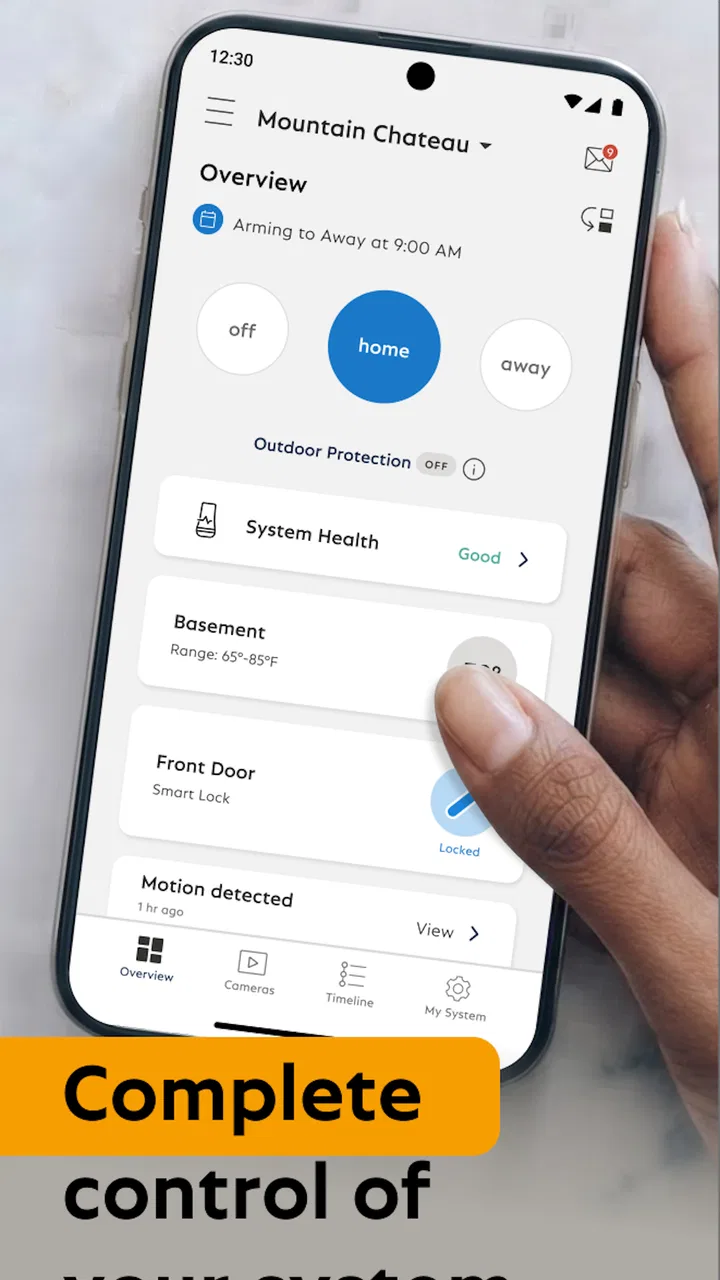
SimpliSafe Home Security App
- 4.5
- Rating
- 1.00M
- Installs
- Free
- Price

 Analysis by App-foxy
Managing a home security system is one of those tasks where an app should feel almost invisible: open it, understand the current situation, make a change, and get on with your day. After spending time with the SimpliSafe Home Security App, I found that its value is closely tied to the wireless SimpliSafe equipment it controls. It is not a general-purpose smart-home dashboard, and that focus is actually one of its clearest strengths. The app is designed for people who want to interact with their SimpliSafe security setup from wherever they are, rather than juggle several unrelated control panels.
Published by SimpliSafe Home Security Systems, this free Lifestyle app has been available since August 24, 2012. It has built a 4.5 average from around 33 thousand ratings, with more than a million installs. Those figures suggest a mature and widely used companion app, but they do not remove the need to consider your own setup. The experience depends on having a compatible SimpliSafe wireless security system in the first place, and the app makes the most sense when remote control is an everyday need rather than an occasional curiosity.
How the app feels during everyday security checks
My first impression is that the app is built around quick decisions. Security controls are not something I want hidden behind decorative screens or a maze of unrelated lifestyle tools. When I check the system before leaving home, I want a clear indication of its state and an obvious route to the action I need. SimpliSafe’s narrow purpose helps it feel more direct than many broad smart-home apps that combine locks, lights, cameras, thermostats, speakers, and security in one crowded interface.
You May Also Like

 Blood Strike: 2.5 Anniversary
Blood Strike’s Loadouts Turn Every Drop Into a Tactical Gamble
A close look at Blood Strike’s custom loadouts: how fast access to signature weapons reshapes its battle royale rhythm, rewards preparation, and narrows the gap between fights.

 Pandora - Music & Podcasts
Pandora’s Music Is Easy to Start, but Harder to Recover
Pandora’s strength is its low-effort path from a seed to a station. Its weak spot is how much confidence it asks you to place in connection, setup, and quiet recovery.

 8 Ball Pool
 Is Built on Rivalries, Rematches, and Routine
A close look at the rivalries, rematches, shared routines, and unanswered safety questions that turn a quick pool match into a persistent mobile community.

 Samsung Music
’s Quiet Strength Is Playing What You Already Own
Its reach comes less from spectacle than from dependable access to a personal library. That simplicity is both the app’s strongest retention engine and its ceiling.

 AccuWeather: Weather Radar
AccuWeather Review: A Quick, Clear Forecast for Everyday Decisions
For everyday plans, the best forecast is the one you can understand quickly. AccuWeather makes rain timing, radar, and local conditions easy to act on, with a few trade-offs.

 Hill Climb Racing
Why Hill Climb Racing Still Turns Crashes Into One More Run
A tiny car, a bumpy hill and one more upgrade: Hill Climb Racing keeps resurfacing because its simple chaos makes every near-miss feel personal.
More From Our News Desk



That focus also shapes my expectations for speed. A security app does not need to behave like a game or a social feed, but it does need to respond predictably when I open it at the front door or while I am already halfway down the street. In normal use, the most important sense of speed comes from how quickly I can locate the system status and begin a command. I would judge it less by flashy transitions and more by whether the app gets out of the way.
A practical habit is to open the app before you need it urgently. I like checking the current state while I am still inside, rather than waiting until I am carrying bags or trying to leave in a hurry. That small routine also gives me a chance to notice whether my phone, account, and security system are communicating normally. For a security product, preparation is more useful than assuming every remote action will be equally convenient at every moment.
The app is especially suitable for a household where several people need a straightforward way to stay aware of the system. A family member leaving later can check the state without asking someone else to confirm it. Someone returning home can use the app as part of a planned arrival routine. These are simple examples, but they show why a dedicated companion app can be more useful than relying only on a physical control point.
What makes remote control genuinely useful
The strongest use case is the ordinary mistake: I leave home and then wonder whether I actually secured it. Instead of turning around, I can check the system remotely and deal with the situation from wherever I am. That is not a dramatic feature, but it is the kind of small convenience that can justify keeping a security app installed. The same applies when I am away for the evening and want reassurance without calling someone at home.
Another worthwhile workflow is using the app as a handoff tool. If a relative, neighbor, or service person needs access to the house, I can think through the security state before they arrive rather than improvising at the door. The app does not replace good judgment, and I would not treat a remote command as proof that every physical condition at home is perfect. Still, having the system available away from the property gives me more control over those awkward moments.
I also appreciate the distinction between checking and changing. A quick status check is a low-effort action, while changing the security state deserves more attention. I recommend pausing long enough to confirm that I am acting on the correct system and that the timing makes sense. That is a useful discipline with any remote security control: convenience should not turn into careless tapping.
Performance when the app is under pressure
The most demanding moments are not necessarily long sessions. They are the short, high-attention situations when I am leaving, arriving, or responding to an unexpected concern. In those moments, perceived performance depends on more than launch speed. I need readable information, a control path that makes sense, and confidence that the action I requested has been accepted. A fast-looking screen would not be enough if the result were unclear.
Heavy use can also mean repeated checking. If I am traveling, I may open the app more often than usual to keep an eye on the system. That pattern exposes any friction in navigation or sign-in more quickly than occasional use does. A dedicated security app has an advantage here because it does not need to compete with a long list of unrelated home-control features. On the other hand, its usefulness is limited if I expect it to become the central place for every connected device in my home.
My advice is to avoid testing an important remote action for the first time during an emergency or while standing outside in poor conditions. Use a calm moment to learn where the status appears and how the app communicates a completed action. This is one of the more valuable, non-obvious steps for new users: familiarity with the control flow reduces hesitation later, even though it cannot guarantee that every connection will behave identically.
Resource demands matter too. The app is not the sort of product I would expect to keep open continuously. It is a task-oriented companion, so I would use it when I need to inspect or manage the security system and then close it. That approach is sensible for battery and attention, especially for people who do not need constant interaction. The app’s role is to provide access when required, not to become another feed that encourages endless checking.
Recovery when something feels stuck
When a security app appears slow or uncertain, my first response is not to repeat the same command rapidly. I would stop, look again at the displayed state, and give the system a moment to reflect the request. Repeated taps can create confusion about what was actually sent, particularly when I am distracted. A more careful recovery routine is to return to the main status view, verify the current condition, and then try one deliberate action.
If the app does not behave as expected, I would also separate phone problems from system problems. A sluggish screen, an unreliable connection, or an issue with the home security equipment can feel similar from the user’s side. Checking the app again after moving to a stronger connection, restarting the app, and confirming that the phone is supported are reasonable first steps. If the problem continues, the right next move is to use SimpliSafe’s support resources rather than assuming that repeatedly reinstalling the app will solve an equipment or account issue.
This recovery mindset is important because security software should not encourage false certainty. If the app is slow to show a new state, I would not assume that the desired change happened merely because I tapped a button. I would wait for a clear confirmation in the interface and, when the situation is important, verify the state again. That is a limitation of remote control in general, but it is also a practical rule that makes this particular app safer to use.
Stability, trust, and the limits of a remote view
In my experience, stability is best understood here as consistency of the overall workflow rather than a promise that every interaction will be instant. The app has the benefit of being a long-established companion for SimpliSafe systems, and its broad adoption makes it feel like a serious, maintained part of the product rather than an experimental extra. Still, the app is one link in a chain that includes the phone, the account, the wireless security setup, and the connection between them.
That chain explains why I would avoid treating the app as the only thing I rely on. A remote status view is valuable, but it should complement sensible household routines. Before leaving, I still prefer a quick physical check of doors and windows when appropriate. When away, I use the app for reassurance and control, not as a substitute for thinking about what is happening at home. This distinction is easy to miss when an app makes remote access feel effortless.
For households with a dependable SimpliSafe installation, the app’s focused design can inspire more confidence than a sprawling alternative. General smart-home platforms may offer a wider range of integrations, but their security controls can be buried among unrelated devices. I would choose this app when the central question is, “What is happening with my SimpliSafe system, and what can I do about it?” I would look elsewhere if I wanted one application to coordinate products from many different security and home-automation brands.
There is also a privacy and attention trade-off in any remotely accessible security tool. I like being able to check the system while away, but that convenience means I should protect the account and phone used to access it. I would avoid sharing access casually, keep the phone itself secured, and make sure household members understand which actions they are taking. These are not glamorous tips, but they matter more than cosmetic interface preferences when the app controls something as sensitive as home security.
Situations where another approach may suit you better
I would not recommend this app to someone who does not own a SimpliSafe wireless security system or who wants a standalone alarm that works without an existing product ecosystem. The app is a companion, not a replacement for the underlying setup. Likewise, if your main goal is to manage lights, heating, entertainment, and several brands of connected equipment from a single dashboard, a broader smart-home platform may be a better fit, even if its security section feels less focused.
It may also be a poor match for someone who dislikes remote controls entirely. If you prefer handling every security action at home and rarely travel, the app may offer less value than it does for a frequent traveler, a busy family, or someone who wants a quick way to check the house from work. The free price removes one barrier to trying it, but it does not change the need for compatible SimpliSafe equipment or make the app universally useful.
Older phones deserve particular attention. The current version is 8.2.0 and requires at least iOS 12, so I would check the operating-system requirement before planning to use it on an older device. That requirement is not unusually demanding for a modern companion app, but it can matter if you keep an aging phone as a dedicated household controller. A supported device is a basic part of a reliable experience, especially when the app is needed at an inconvenient time.
Device constraints and practical setup habits
The phone is only one part of the experience, but it is the part I hold when making a remote decision. I prefer using a device with a comfortable screen and a stable connection rather than attempting important actions on a phone that is nearly out of battery or struggling with other tasks. The app’s Everyone age rating makes it broadly suitable from a content perspective, although responsible household access still matters because security controls should not be treated like a casual game.
I would set aside a few minutes after installation to learn the app without pressure. Confirm that I can identify the system state, find the relevant control, and recognize what a completed action looks like. This is more useful than simply installing it and assuming I will understand everything during a rushed departure. It also answers a common practical question: whether the app will fit naturally into my routine. If a basic check already feels confusing, I would rather discover that early.
Another helpful habit is to keep the app’s purpose narrow in my mind. I would not use it as a general checklist for the entire property, and I would not assume that a remote status tells me every detail about what is happening in each room. The app gives me a way to interact with the SimpliSafe system; it does not eliminate the need for physical awareness, sensible access practices, or a backup plan for unusual situations.
When several people use the same household system, clarity becomes more important than speed. I would make sure everyone understands the difference between checking a state and changing it, and I would avoid informal instructions such as “just tap the main button” without explaining what should appear afterward. That small communication step can prevent one person from believing the system is secure while another person has changed its state for a completely different reason.
My performance verdict after living with the workflow
SimpliSafe Home Security App works best as a focused remote companion for people already invested in SimpliSafe’s wireless security system. I like its clear purpose, its usefulness during everyday “did I secure the house?” moments, and the way it avoids trying to become an all-purpose smart-home control center. The free entry point and Everyone rating make it approachable, while the long availability of the app and its strong 4.5 average indicate that many users have found the basic idea worthwhile.
Its performance should be judged by dependable, understandable interaction rather than entertainment-style speed. When I am checking the system from a normal situation, the focused workflow is more valuable than a pile of extra features. During a stressful moment, I still need patience: verify the displayed state, avoid repeated taps, and remember that the app depends on more than the phone alone. That is the central trade-off of remote security control, and it is not something a polished interface can completely remove.
The app is a good recommendation for SimpliSafe owners who travel, share responsibility for a home, or simply want remote access when plans change. I would skip it if I do not have compatible SimpliSafe equipment, if I want one app for many unrelated brands, or if I strongly prefer a completely local, hands-on routine. For the right household, though, it adds practical control without demanding constant attention. The best reason to install it is not novelty; it is the quiet reassurance of having the security system within reach when home is somewhere else.
Before relying on it, I would confirm that the phone meets the minimum operating-system requirement, install it while I have time to explore, and practice checking the system before an important trip. Those steps make the experience more predictable and help reveal whether it suits the way I actually manage security. In my view, that combination of focused design, useful remote access, and realistic limitations makes this a sensible Lifestyle app for SimpliSafe households, provided it is used as one part of a broader security routine rather than as a substitute for common sense.
FAQs for SimpliSafe Home Security App
01What is the SimpliSafe Home Security app used for?
The SimpliSafe Home Security app is the mobile control center for a compatible SimpliSafe alarm system. After signing in, you can arm or disarm the system, check sensor and camera activity, receive security alerts, view live video, and manage selected settings remotely. Its usefulness depends on having SimpliSafe hardware installed, an internet connection, and an account with the appropriate service features.
02Do I need SimpliSafe equipment or a subscription to use the app?
Yes, the app is primarily designed for owners of a SimpliSafe home security system, including equipment such as a base station, keypad, entry sensors, cameras, or other compatible devices. Some basic app functions may be available with an account, but professional monitoring, cloud video storage, and certain advanced features generally require a suitable paid plan. Check current pricing and compatibility before downloading.
03Can I control my SimpliSafe alarm system remotely?
When your system is properly connected and your account has the required permissions, the app lets you perform important actions remotely, such as arming or disarming the alarm and checking its current status. You can also receive notifications when sensors are triggered. Remote control is dependent on your phone’s internet connection, the system’s connectivity, and any account or monitoring restrictions.
04Does the SimpliSafe app support security cameras and video monitoring?
The app supports compatible SimpliSafe cameras, allowing users to view live feeds and, depending on their equipment and plan, access recorded clips or other video features. Camera performance can vary with Wi-Fi quality, lighting, device placement, and network congestion. Before relying on it for continuous monitoring, review the supported camera models, storage rules, privacy settings, and subscription requirements.
05Is the SimpliSafe Home Security app easy and safe to use?
The app is designed with a straightforward layout, making common tasks such as checking system status, viewing alerts, and managing cameras relatively easy for most users. However, security depends on keeping the app updated, using a strong unique password, protecting your phone, and enabling available account security options. Users should also understand that no internet-connected security service can guarantee uninterrupted protection.
Pros
- Quickly arm or disarm the system from anywhere with a simple interface.
- Live video streaming helps you check your home while away.
- Custom alerts can notify you about alarms
- activity
- or system changes.
- Works with SimpliSafe cameras
- sensors
- locks
- and other security devices.
- Shared access lets household members manage the system from their own phones.
Cons
- Many useful features require an active SimpliSafe monitoring subscription.
- Video performance depends heavily on your home internet connection.
- Some advanced controls are limited to compatible SimpliSafe hardware.
- Frequent notifications may become overwhelming without careful customization.
- Remote access is unavailable if the security system or network loses power.

SimpliSafe Home Security App
Gallery